
OpenAI has released ChatGPT Atlas, a new web browser built with its ChatGPT AI assistant at the core. Announced on October 21, 2025, Atlas represents OpenAI’s bold move into a domain long dominated by Google, effectively putting the ChatGPT maker in direct competition with Chrome. Sam Altman, CEO of OpenAI, described this as a “once-a-decade opportunity to rethink what a browser can be,” noting that web browsers haven’t seen major innovation since the invention of tabs. Unlike a traditional browser with an AI plugin, Atlas is built around the AI – meaning ChatGPT isn’t an add-on, but rather the central interface and logic through which you interact with the web. Atlas launched initially for macOS users worldwide, with Windows, iOS, and Android versions on the way. It’s free for anyone to use, though some advanced capabilities (like the AI “agent” features) are reserved for paid ChatGPT Plus/Pro subscribers.
What is ChatGPT Atlas?
ChatGPT Atlas is essentially a web browser with an AI copilot built-in from the ground up. In practice, it transforms the browsing experience into a conversation with ChatGPT. Instead of the standard homepage or search engine, Atlas’s start page is a ChatGPT prompt where you can ask questions or issue commands, alongside a traditional URL bar. The browser still loads websites, but the AI is always present to assist – whether it’s summarizing the page you’re on, finding information, or even performing actions on websites. The entire interface and workflow is centered around interacting with the AI, which can interpret commands like “book a hotel like this one but cheaper” and act on them. Atlas blurs the line between a web browser and a personal assistant, aiming to augment how users search, work, and navigate online through AI-driven context and automation.
.png)
Key Features and Capabilities
ChatGPT Integrated in Every Tab
Each new tab in Atlas can become a conversation with ChatGPT. The browser has ChatGPT responses built into the tab interface. You can type a question, ask for a summary of a webpage, or launch a research task right in the address bar or a sidebar, and get answers in real time. When you enter a query, you see an AI-generated answer from ChatGPT first, with traditional search results available on separate tabs (for web links, images, videos, or news). ChatGPT is omnipresent during browsing – ready to answer questions, provide explanations, or even generate content at any moment in any tab.
Context Awareness and Personalization
Atlas understands the context of your browsing to give more relevant help. With your permission, it can be aware of what website or content you’re currently looking at, what other tabs are open, and even your logged-in status on sites. This means ChatGPT’s answers can be tailored to your situation. It learns from your behavior over time, remembering what you’ve already searched or clicked. On the Atlas home screen, you’ll see personalized suggestions like “Continue your research on X” or “You were reading about Y yesterday.”
In-line Assistance for Writing and Editing
Atlas assists with writing directly within web pages. If you’re composing an email in Gmail or editing a document in Google Docs, you can highlight the text and ask ChatGPT to help rewrite or refine it. The AI can suggest clearer wording, fix grammar, or adjust the tone of your text in-place. This extends to many scenarios – from filling out forms to crafting social media posts. Wherever there’s a text box in the browser, Atlas’s AI can step in to assist.
Browser Memories (Browsing Context Memory)
ChatGPT Atlas can optionally maintain a memory of what you do across the web. If you enable Browser Memories, Atlas will save key facts and summaries from the sites you visit. These are distilled notes the AI makes to help in later interactions. For example, it can remember what you looked at and help retrieve that information later. This gives powerful recall across your browsing history and makes ChatGPT a truly personalized assistant.
Natural Language Commands for Browsing
Atlas allows you to control your browsing via plain English commands. Instead of clicking around for routine actions, you can say or type instructions like “Reopen the travel site I was on yesterday” or “Close all my recipe tabs,” and Atlas will interpret that and perform the action. This natural language control helps reduce the friction of managing browser UI elements and allows for more productive workflows.
Agent Mode – Autonomous Web Actions
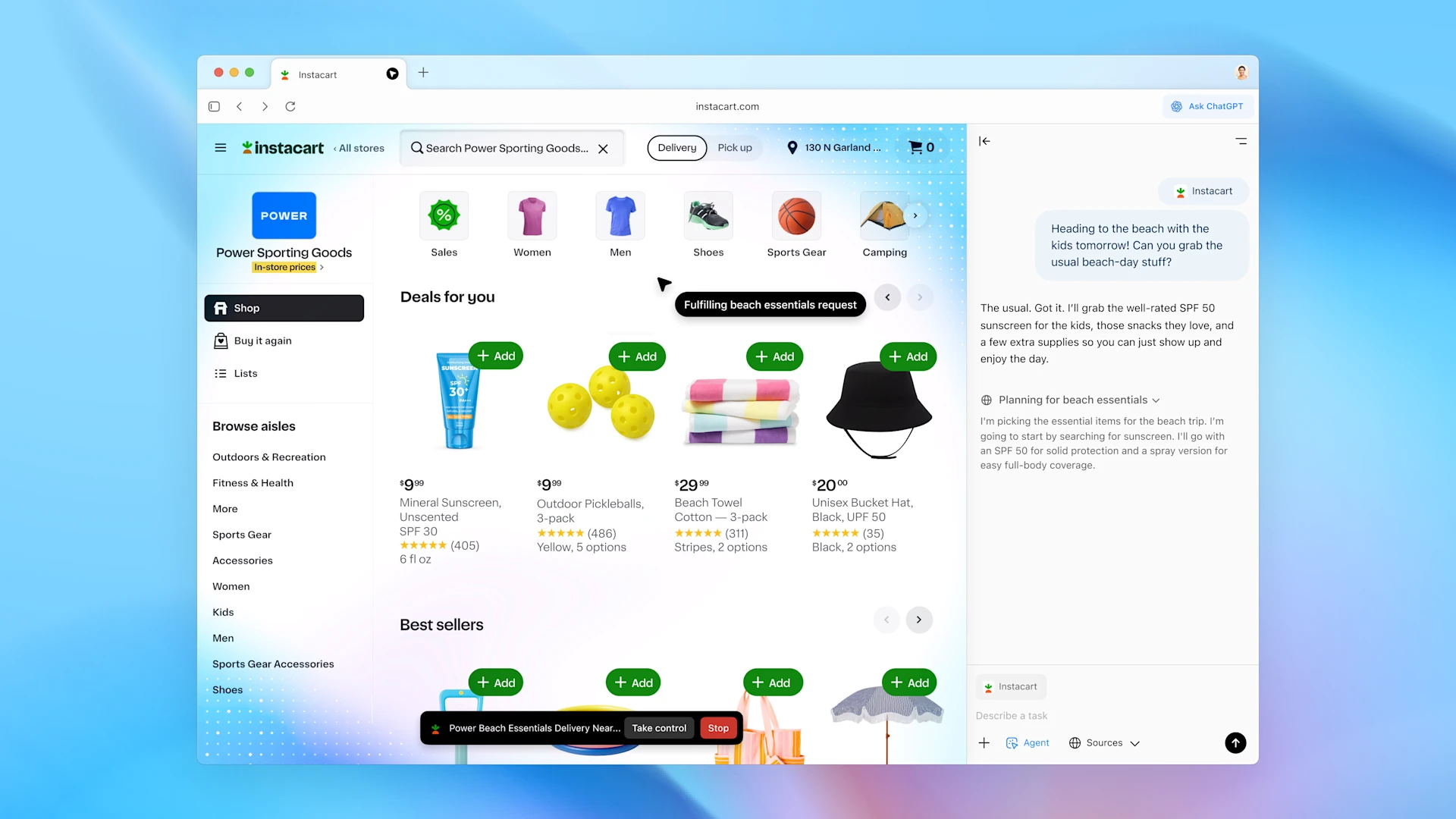
Agent Mode allows ChatGPT to take actions on the web autonomously on your behalf. The AI can control the browser – clicking links, filling out forms, and navigating through websites – in order to accomplish a multi-step goal. This is useful for tasks like ordering groceries, booking travel, or compiling research from multiple sites. Agent Mode is an early preview feature available to ChatGPT Plus, Pro, and Business users. It is constrained to browser actions and includes safeguards such as requiring confirmation before significant actions, and logged-out mode to protect sensitive account data.
Privacy and User Control
OpenAI has built a range of user controls to govern data sharing. Key privacy and control features include:
- Memory toggle: Easily prevent a specific page from being saved.
- Incognito Mode: Disables memory and logs you out of ChatGPT.
- Memory Management: Review and delete saved memories.
- Parental and Admin Controls: Memory and agent mode can be disabled for supervised or enterprise accounts.
- No Training on Your Data (by default): Atlas will not use browsing data to train OpenAI models unless explicitly allowed.
Privacy experts have raised concerns about the extent of data collection, with some calling it a potential overreach. OpenAI stresses that using Atlas in a privacy-conscious way is possible through available settings and safeguards.
How It Works in Practice
Browsing & Search Experience
Using ChatGPT Atlas feels like having a smart assistant co-navigating the web. The search box accepts both URLs and natural language queries. Atlas responds with a conversational answer from ChatGPT, and also provides traditional search results. Users can interact with pages and ask ChatGPT to explain or summarize content. The AI acts as an intelligent layer over the entire web.
Use Cases and Scenarios
- Research and Learning: Summarize long articles, answer questions in context, compare multiple sources.
- Everyday Productivity: Book travel, compare products, remember past browsing sessions.
- Content Creation and Tech Writing: Draft and refine text, generate outlines, assist with formatting.
- Developers: Summarize error messages, explain code snippets, navigate developer tools.
- Cross-Platform Continuity: Memory and context are shared across devices and ChatGPT interfaces.
Early Reception and Reviews
Early reviewers praise Atlas as a bold and innovative step in browser design. Many note that it makes browsing more efficient and collaborative. However, there are concerns about privacy, content filtering, and lack of a robust extension ecosystem. OpenAI has committed to addressing these concerns and improving the product with frequent updates.
ChatGPT Atlas redefines the web browser by integrating an AI assistant into every aspect of online interaction. It offers powerful features for productivity, research, and automation, while also introducing new privacy considerations. With thoughtful use and proper settings, users can benefit greatly from this new paradigm. Atlas may very well influence the next generation of web tools, making AI-driven browsing a mainstream reality.

.png)